Polling vs SSE vs WebSockets: How Real-Time Communication Works
 Sayan Dey•8 min read•1st Oct, 2026backend
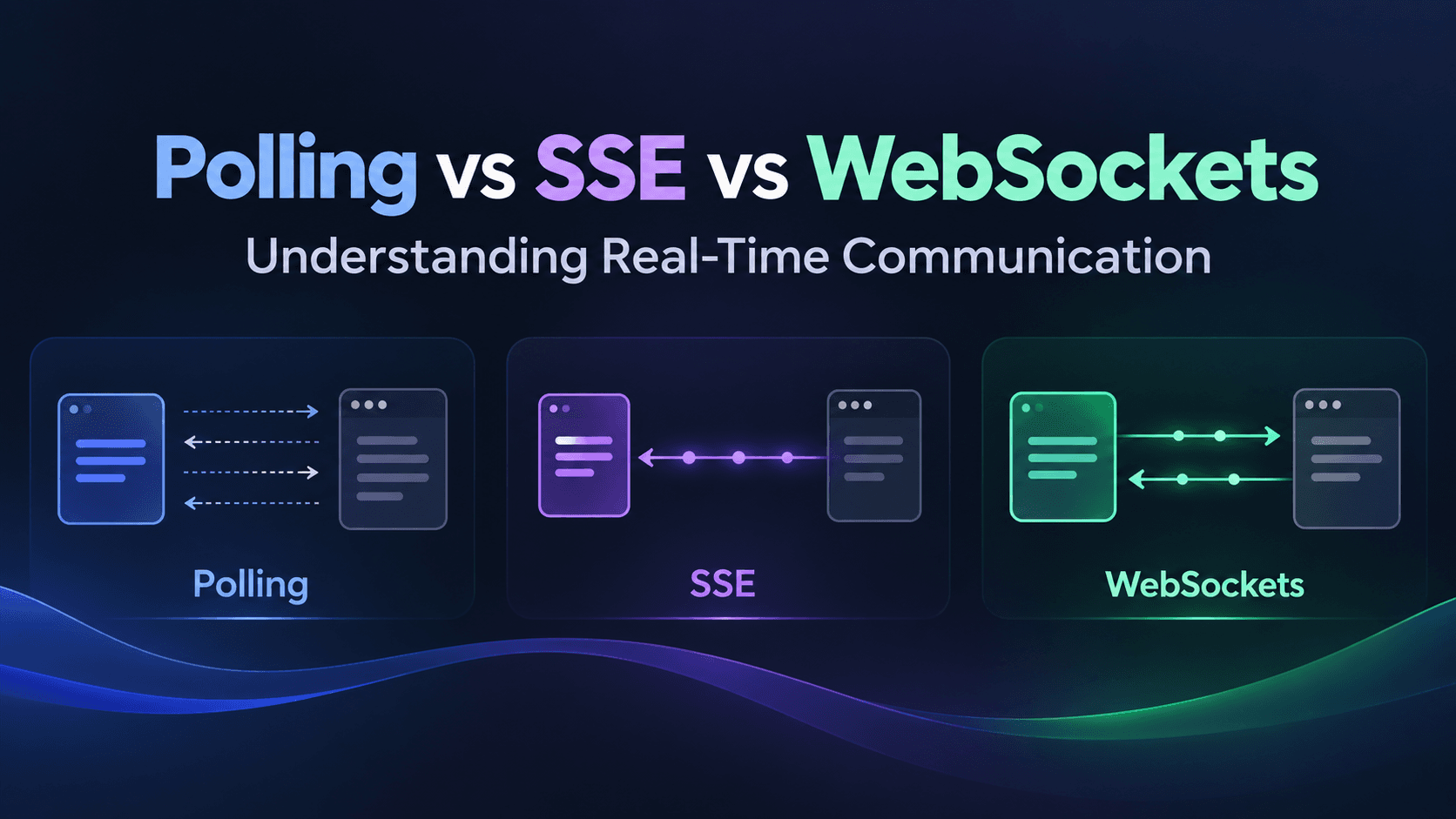
Learn how Polling, Server-Sent Events (SSE), and WebSockets work, how they differ, and when to use each approach for real-time communication in modern applications.
Table of Contents
- Overview
- Polling
- Server-Sent Events (SSE)
- WebSocket
- Polling vs SSE vs WebSockets
- How to Choose?
- Conclusion
Overview:
For many modern applications sometimes we need real-time communication . Whenever we hear about websockets or real-time app , the only thing that comes in our mind , Chat App. But those are not only used in chat app. Major implementation of these is Real time Dashboard. And those are also used in treading apps , sports apps also.
This blog will guide you about the mechanism behind the real-time apps.
Polling:
In polling , the basic idea is the client will ask the server about something continuously with an interval of time. In polling we have 2 types : Long Polling , Short Polling.
Long Polling:
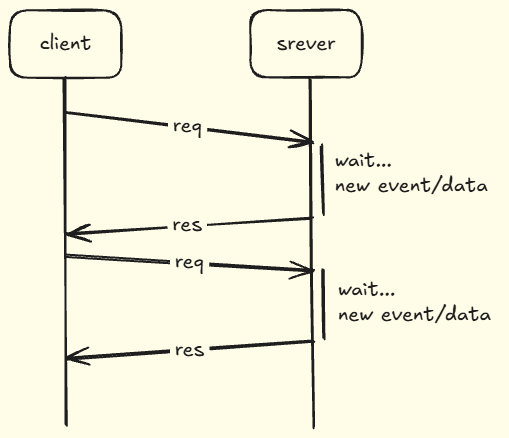
In long polling, the client sends a request to the server and the server keeps the request pending until new data is available or a timeout occurs. Once the data is available, the server sends the response and the request is completed. The client then sends another request and the process continues.
Server:
app.get("/api/events", async (req, res) => {
  res.setHeader("Cache-Control", "no-cache");
  res.setHeader("Connection", "keep-alive");

  const event = await waitForEvent();

  res.json(event);
});
Here:
await waitForEvent();
represents the server waiting for a new event.
Client:
async function poll() {
  const res = await fetch("/api/events");
  const data = await res.json();

  console.log(data);

  poll();
}
poll();
Here, whenever client get the data , it asks again for the new data.
Short Polling:
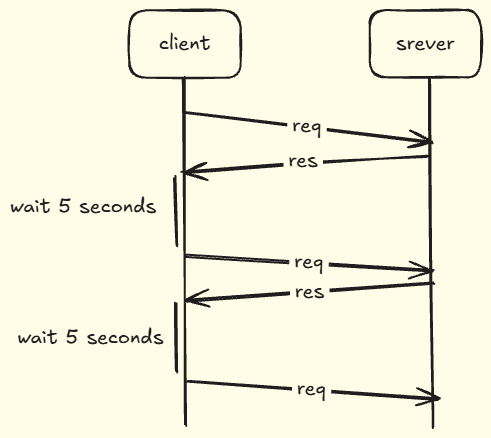
Here the client decides the amout of time it will wait. Client sends a request to server and the server sends back the response immediately but after receiving the response the client will wait for a specific amout of time then again request the server and continue.
Server:
app.get("/api/data", (req, res) => {
  res.json({
    message: "Latest data",
    time: Date.now()
  });
});
Client:
setInterval(async () => {
  const res = await fetch("/api/data");
  const data = await res.json();

  console.log(data);
}, 5000);
The client request after a specific time of interval.
Key Features of Polling:
- Uses normal HTTP requests
- Client repeatedly requests data
- Easy to implement
- No special persistent connection is required
- Can be implemented using standard HTTP APIs
Advantages:
- Simple: Easy to understand and implement.
- Compatible: Works with normal HTTP infrastructure.
- Easy to debug: Requests can be inspected using normal browser/network tools.
- Flexible: The polling interval can be adjusted according to the application's requirements.
Limitations:
- Unnecessary requests: The client may request data even when nothing has changed.
- Higher server load: Frequent polling can generate a large number of HTTP requests.
- Latency: With short polling, an update may have to wait until the next polling interval.
- Not truly real-time: The client is continuously checking for changes rather than receiving them immediately.
Note:
Polling requests can be distributed across multiple servers using a load balancer, but the total number of requests does not decrease. Frequent polling can still create unnecessary load across the infrastructure.
Server-Sent Events (SSE):
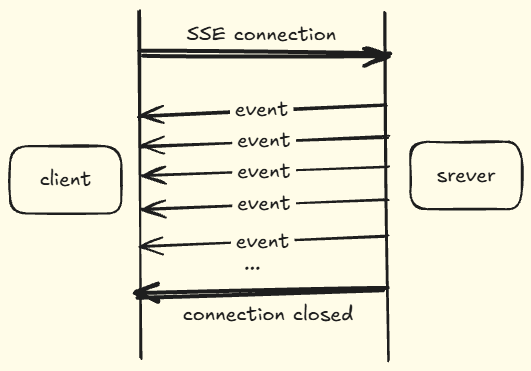
We don't want to request every second and don't want the latency , so we use SSE (server-sent events). Here a connection is created between server and client and a channel opened , whenever there is any event or any changes the server gives it to the client . The connection is kept open so the server can continuously send events. If the connection is lost, EventSource can automatically attempt to reconnect
The SSE connection is primarily used for server-to-client communication.
The client can still make separate HTTP requests to the server, but it
cannot send messages back through the SSE stream itself.
Server:
app.get("/events",  {
  res.(, );
  res.(, );
  res.(, );

   interval = ( {
    res.();
  }, );

  req.(,  {
    (interval);
  });
});
We're not closing the response after sending one piece of data. We keep writing events to the same connection.
Client:
const events = new EventSource("/events");

events.onmessage = (event) => {
  console.log(event.data);
};
Key Features:
- Persistent HTTP connection
- Server → Client communication
- Event-based data streaming
- Built on standard HTTP
- Native browser EventSource API
- Automatic reconnection
- Text-based event stream
Advantages
- Simple to implement
- Uses standard HTTP
- Automatic reconnection
- Excellent for server-to-client updates
- Less complex than WebSockets for one-way communication
- Works well with existing HTTP infrastructure
Disadvantages
- Communication is primarily one-way
- Text-based rather than a general binary protocol
- Persistent connections consume server resources
- Not ideal for applications requiring frequent bidirectional communication
WebSocket
WebSocket is used for bidirectional , persistent data transfer. Here we do not need to request the server every time , here a channel between the server and the client is created and then both can send data independently.
Connection:
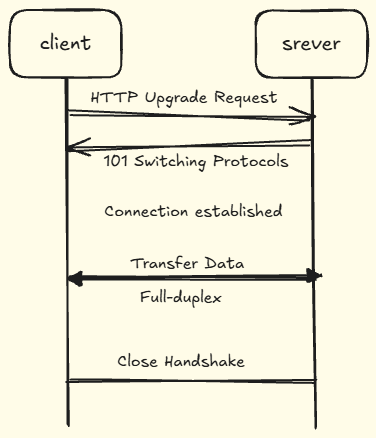
To establish the connection , the method behind it is Websocket handshake. The client initially connect the server with http request to switch to websocket , and the server response back with 101 Switching Protocols .This tells the client that the connection is being upgraded from HTTP to the WebSocket protocol.
After this point, communication happens through the WebSocket connection.
Server:
import { WebSocketServer } from "ws";

const wss = new ({ :  });

wss.(,  {

  socket.();

  socket.(,  {
    .(, message.());

    socket.();
  });

});
Client:
const socket = new WebSocket("ws://localhost:3000");

socket.onmessage = (event) => {
  console.log("Server:", event.data);
};

socket.onopen = () => {
  socket.send("Hello Server");
};
Both sides can send whenever they want.
Key Features:
- Bidirectional communication
- Full-duplex communication
- Persistent connection
- Low-latency messaging
- Event-driven communication
- Supports text and binary data
- Uses the WebSocket protocol
Advantages:
- Real-time bidirectional communication
- Low latency
- Efficient for frequent data exchange
- No repeated HTTP request for every message
- Supports both text and binary data
- Suitable for highly interactive applications
Disadvantages:
- More complex than polling and SSE
- Requires connection and reconnection management
- Scaling persistent connections can be challenging
- Requires additional infrastructure considerations
- Can be unnecessary when only server-to-client communication is required
Polling vs SSE vs WebSockets
| Feature | Polling | SSE | WebSockets |
|---|---|---|---|
| Communication | Request → Response | Server → Client | Client ↔ Server |
| Connection | Repeated HTTP requests | Persistent HTTP connection | Persistent WebSocket connection |
| Direction | Both, through separate HTTP requests | Primarily one-way | Bidirectional |
| Real-time updates | Depends on polling interval | Near real-time event stream | Real-time messaging |
| Client requests required for updates | Yes | No | No |
| Connection remains open | No | Yes | Yes |
| Automatic browser reconnection | ❌ | ✅ with EventSource | ❌ — usually application-managed |
| Data type | HTTP response data | Text event stream | Text and binary |
| Implementation complexity | Low | Low–Medium | Medium–High |
| Best suited for | Periodic updates | Server-driven updates | Interactive bidirectional apps |
| Common examples | Simple dashboards, status checks | Notifications, live feeds, streaming updates | Chat, games, collaboration |
How to Choose?
A simple way to decide is to ask:
1. Do I only need occasional updates?
Use Polling.
Client → "Anything new?"
Server → "Here's the latest data."
Good when updates aren't frequent and simplicity is important.
2. Does the server need to continuously send updates?
Consider SSE.
Server ──→ Event
Server ──→ Event
Server ──→ Event
Good for:
- Live notifications
- Dashboards
- Sports scores
- Monitoring
- Streaming updates
3. Do both client and server need to communicate continuously?
Consider WebSockets.
Client ──→ Server
Client ←── Server
Client ──→ Server
Client ←── Server
Good for:
- Chat applications
- Multiplayer games
- Collaborative applications
- Interactive real-time systems
- Applications with frequent two-way communication
Conclusion
Real-time communication is an important part of many modern applications, but there isn't a single mechanism that fits every use case.
Polling is simple and works well when the client only needs to periodically check for updates. SSE provides a persistent server-to-client stream and is useful when the server needs to continuously send events to the client. WebSockets provide a persistent, bidirectional connection and are useful when both the client and server need to exchange data frequently.
Understanding the communication pattern of your application is more important than simply choosing the most advanced technology.
Polling
→ Repeatedly ask for updates

SSE
→ Server continuously sends events

WebSockets
→ Client and server communicate bidirectionally
Once you understand these differences, you can choose the communication mechanism that matches your application's requirements rather than treating every real-time problem as a WebSocket problem.
#polling#long-polling#short-polling#backend#http#web-development#sse#websocket#server-sent-events#real-time-communication
343 views